Finance
TradingView Free vs Paid: Best Plan in 2026?
TradingView’s free plan is excellent for beginners, but paid plans unlock more charts, indicators, alerts, and advanced analysis tools. We compare Basic, Essential, Plus, Premium, and Ultimate to find the best TradingView plan in 2026.
By Worth-the-cart
•
•
3 min read


The most expensive TradingView plan is not necessarily the one with the highest price—it is the plan that makes you pay for features you never use or wastes your time because it is too limited.
That is the real decision behind TradingView Free vs Paid.
The free plan is genuinely useful. It is not a meaningless demo designed to become unusable after five minutes. You can open charts, add indicators, build a watchlist, create a few price alerts, and practice with virtual funds through paper trading without paying for a subscription.
But the free plan also introduces small points of friction. You can display only one chart per tab, use two indicators per chart, and maintain three active price alerts. None of those restrictions sounds serious until you try comparing several timeframes, watching multiple assets, or using a strategy that needs more than two indicators.
The paid plans are where TradingView begins to feel less like a chart website and more like a complete market-analysis workspace.
This TradingView review compares Basic, Essential, Plus, Premium, and Ultimate using current 2026 pricing, practical workflows, and the features that actually affect everyday use. The goal is not to recommend the most expensive subscription. It is to find the least expensive plan that removes the limitations standing between you and a cleaner workflow.
You can access eligible paid plans through the WorthTheCart TradingView coupon page, which includes access to a 30-day free trial and a $15 discount coupon toward a plan. Use the trial to test your real workflow before committing to a full year.
TradingView Free vs Paid: The Short Answer
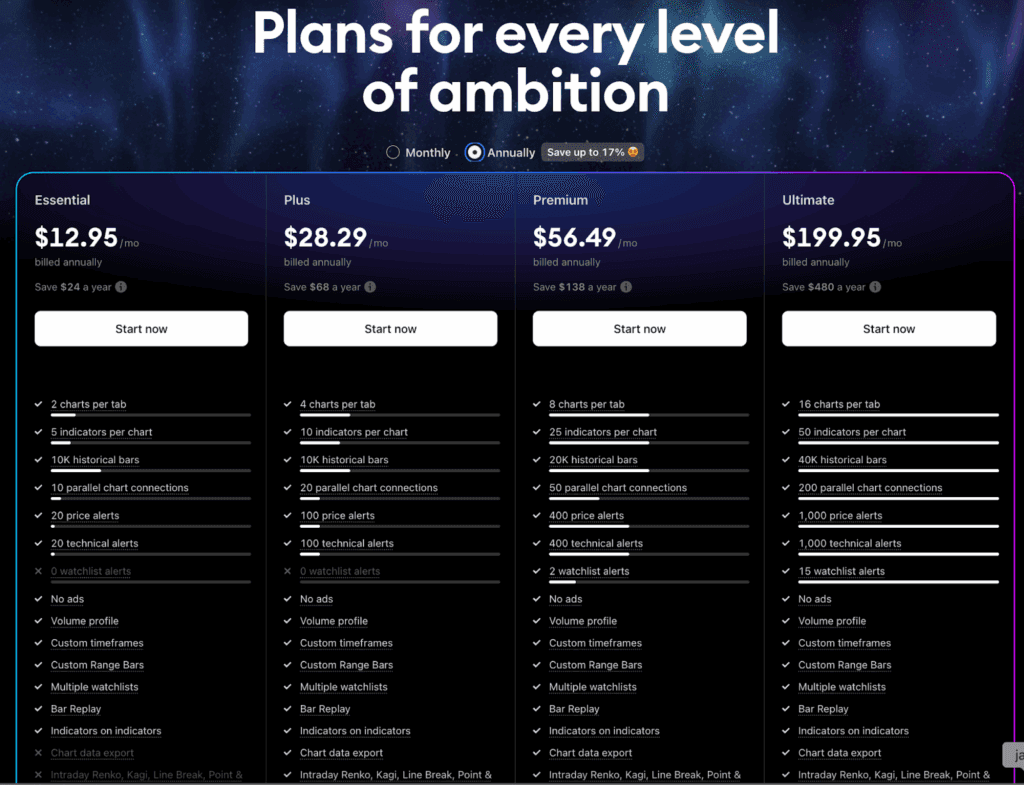
TradingView Basic is best for beginners who are still learning the platform. Essential offers the best value, while Plus is the best overall plan for most people who regularly analyze markets. Premium is worth considering for serious active traders, and Ultimate is intended for professional or unusually demanding setups.
My strongest recommendation is TradingView Plus.
Plus gives you four charts per tab, 10 indicators per chart, 100 active price alerts, 100 technical alerts, 10,000 historical bars, and 20 parallel chart connections. That is enough capacity for a serious multi-timeframe workflow without paying for the enormous limits included with Premium or Ultimate.
Essential is the better choice when affordability matters more than having several charts visible simultaneously. At $12.95 per month with annual billing, it removes advertisements, raises the chart and indicator limits, and increases the number of alerts dramatically compared with Basic.
Premium is excellent for someone who already knows why they need eight charts, 25 indicators, 400 price alerts, and watchlist alerts. Those features can save meaningful time, but only if they are part of an established routine.
Ultimate is powerful, but its $2,399.40 annual price makes it a specialized professional tool rather than a normal upgrade.
WorthTheCart Score
Category | Score |
|---|---|
Charting and Analysis | 9.7/10 |
Ease of Use | 9.3/10 |
Everyday Usefulness | 9.5/10 |
Plan Flexibility | 9.2/10 |
Value | 9.0/10 |
Potential Buyer’s Regret | 8.7/10 |
Overall TradingView Score | 9.3/10 |
WorthTheCart verdict: TradingView is one of the easiest charting platforms to recommend because the free version is useful and the paid plans offer clear workflow improvements. Essential is the best-value plan, but Plus is the strongest overall choice for regular users.
What TradingView Actually Does
TradingView is primarily a charting, market-analysis, and research platform. It gives users access to interactive charts covering stocks, cryptocurrencies, forex, futures, indices, ETFs, bonds, and other markets.
The charts are the main attraction, but the platform extends far beyond drawing a trendline on a stock price.
Depending on the plan and market, users can access:
Technical indicators
Drawing tools
Custom Pine Script indicators
Stock and crypto screeners
Watchlists
Price and technical alerts
Economic and earnings calendars
News and community ideas
Bar Replay
Strategy testing
Paper trading
Broker integrations
Desktop and mobile applications
Multi-monitor layouts
The interface is one of TradingView’s biggest strengths. A beginner can search for a ticker and open a clean chart without understanding every advanced feature. An experienced user can build complicated layouts, create custom indicators, test strategies, and connect a supported broker.
That flexibility is difficult to achieve. Software made for professional analysis often feels unapproachable, while beginner-friendly platforms can become limiting very quickly. TradingView manages to serve both groups without forcing every new user through a complex setup process.
The platform does not create a profitable strategy for you, and a paid subscription does not make market predictions more accurate. What it can do is organize information, reduce repetitive chart switching, and notify you when conditions you selected occur.
That distinction matters. TradingView is a tool for making your process more efficient—not a shortcut around risk, research, or decision-making.
TradingView Price and Plan Comparison
The following TradingView price comparison uses U.S. dollar pricing reviewed in July 2026. Annual plans are charged as one payment, and applicable sales tax may be added depending on location.
Plan | Monthly Billing | Annual Rate | Annual Total | Charts Per Tab | Indicators Per Chart | Price Alerts | Historical Bars | Score |
Basic | Free | Free | $0 | 1 | 2 | 3 | 5,000 | 8.4/10 |
Essential | $14.95/month | $12.95/month | $155.40 | 2 | 5 | 20 | 10,000 | 9.1/10 |
Plus | $34.95/month | $29.95/month | $359.40 | 4 | 10 | 100 | 10,000 | 9.5/10 |
Premium | $69.95/month | $59.95/month | $719.40 | 8 | 25 | 400 | 20,000 | 9.0/10 |
Ultimate | $239.95/month | $199.95/month | $2,399.40 | 16 | 50 | 1,000 | 40,000 | 8.0/10 |
TradingView’s official comparison also lists 20 technical alerts for Essential, 100 for Plus, 400 for Premium, and 1,000 for Ultimate. Premium includes two watchlist alerts, while Ultimate increases that limit to 15. TradingView’s official pricing page
The annual totals originally look high because TradingView bills the entire year at once. The effective monthly price is lower than paying month by month, but the upfront commitment is much larger.
It is also worth noting that TradingView’s pricing and promotional offers can change. Check the final checkout page before paying, particularly if you are reading this review later in 2026.
Basic: Is TradingView Free Enough?
TradingView Basic is more capable than many free software plans.
You receive one chart per tab, two indicators per chart, 5,000 historical bars, one watchlist containing up to 30 symbols, and three active price alerts. You can also use drawing tools, access screeners, view community-created indicators, and practice through paper trading.
For someone opening TradingView for the first time, that is enough to understand what the platform does.
A beginner can search for a stock, change the timeframe, add indicators such as moving averages or RSI, mark support and resistance areas, and save a basic layout. You can learn the interface without providing payment information or rushing through a short demo.
The free plan is also enough for many long-term investors. If you check a handful of companies occasionally and do not need several intraday charts open simultaneously, paying every month may be unnecessary.
The limitations become noticeable when analysis becomes more frequent.
Imagine checking a potential setup on the daily, four-hour, one-hour, and 15-minute charts. With Basic, you must move between those timeframes one at a time. That is possible, but it creates more clicking and makes direct comparisons harder.
Two indicators can also feel restrictive. A setup using volume, two moving averages, and RSI already exceeds the limit. That does not mean adding more indicators automatically improves analysis, but it is frustrating when the platform rather than your strategy decides how many you can display.
The three-alert limit is another common reason to upgrade. If you follow several stocks or cryptocurrencies, three alerts can disappear quickly. You may have to delete a useful alert just to create another one.
Basic also includes advertisements. They do not make the platform unusable, but removing them makes the interface feel cleaner and more focused.
Who Should Use Basic?
Choose Basic if you:
Are completely new to TradingView
Want to learn charting without paying
Check markets occasionally
Follow a small number of assets
Use no more than two indicators
Do not need multiple charts visible at once
Want to try paper trading
Are not yet sure which paid features matter
Basic is the right place to start. The mistake is not using the free plan—it is remaining on it after its limits begin wasting your time.
Essential: The Best-Value TradingView Plan
TradingView Essential is the easiest paid plan to justify.
It costs $14.95 when paid monthly or $12.95 per month with annual billing, totaling $155.40 per year. That works out to approximately $0.43 per day.
For that price, Essential provides:
Two charts per tab
Five indicators per chart
10,000 historical bars
10 parallel chart connections
20 active price alerts
20 technical alerts
Multiple watchlists
Custom timeframes
Bar Replay
Volume Profile
Chart-data export
No advertisements
Access through web, desktop, and mobile apps
The improvement is larger than the plan name makes it sound.
Two charts per tab let you compare two timeframes or assets without constantly switching the same chart. You might keep the daily trend on one side and a one-hour entry chart on the other. A long-term investor could compare a company with an index or a direct competitor.
Five indicators per chart are enough for most sensible technical setups. There is room for volume, moving averages, momentum, and another tool without immediately hitting a limit.
The jump from three price alerts to 20 is even more useful. Alerts let the platform watch the market while you do something else. TradingView can notify users through its web, desktop, and mobile apps when selected price or technical conditions occur. TradingView’s alert guide
For someone working, studying, or simply trying not to stare at charts all day, alerts may be more valuable than adding another indicator. They reduce the temptation to check prices constantly.
Essential is also ad-free. This does not change the market data, but it improves the experience every time you open the platform.
Who Should Choose Essential?
Essential is best for:
Beginners ready to move beyond Basic
Long-term investors following several assets
Casual swing traders
Users who want an ad-free workspace
People who need more alerts
Anyone who wants two timeframes visible together
Buyers who want the lowest-cost serious TradingView plan
Essential receives a 9.1/10 because it removes most of the free plan’s everyday frustrations without becoming expensive.
Plus: The Best TradingView Plan for Most Active Users
TradingView Plus is my best overall choice.
It costs $34.95 with monthly billing or $29.95 per month when billed annually. The annual payment is $359.40, which equals approximately $0.98 per day.
Plus includes:
Four charts per tab
10 indicators per chart
10,000 historical bars
20 parallel chart connections
100 active price alerts
100 technical alerts
Multiple saved layouts and watchlists
No advertisements
Custom timeframes
Bar Replay
Volume Profile
Chart-data export
Access to desktop, web, and mobile apps
Four charts per tab are where TradingView begins to feel like a proper analysis workstation.
A swing trader can view weekly, daily, four-hour, and one-hour charts simultaneously. An active stock trader could use the four panels for the broader market, an industry ETF, a selected stock, and a lower-timeframe entry chart.
This matters more than it sounds. Switching timeframes is not difficult, but it interrupts the comparison. When several charts are visible at once, you can see whether a short-term move agrees with the larger trend without repeatedly changing the active chart.
The 100 price and 100 technical alerts are generous enough for most individuals. You can follow a meaningful watchlist without constantly deleting and recreating alerts.
Ten indicators per chart also provides breathing room. I would not recommend filling every chart with 10 indicators simply because the plan allows it. Too much information can become just as confusing as too little. The value is having enough capacity to build the layout you want without thinking about the limit.
A Practical Time-Saved Calculation
Suppose a four-chart layout saves only five minutes of switching and rebuilding context on each of 250 market days.
That equals:
5 minutes × 250 days = 1,250 minutes, or approximately 20.8 hours per year
At an annual price of $359.40, that hypothetical time saving costs approximately:
$359.40 ÷ 20.8 hours = $17.28 per hour saved
This does not mean every subscriber will save exactly that amount of time. It shows why workflow improvements can be worth paying for even when they do not directly create profit.
If you regularly compare several timeframes, Plus can remove enough friction to justify the price.
Who Should Choose Plus?
Plus is best for:
Regular swing traders
Active investors
Traders comparing several timeframes
Users following larger watchlists
People who depend on price and technical alerts
Anyone using TradingView several days per week
Buyers seeking the best balance between features and price
Plus earns a 9.5/10 and is my strongest overall recommendation.
Premium: Worth It for Serious Traders
TradingView Premium costs $69.95 with monthly billing or $59.95 per month when billed annually. The annual total is $719.40, or approximately $1.97 per day.
Premium includes:
Eight charts per tab
25 indicators per chart
20,000 historical bars
50 parallel chart connections
400 active price alerts
400 technical alerts
Two watchlist alerts
Second- and tick-based intervals
Alerts with an open-ended duration
Multiple advanced chart and analysis tools
No advertisements
This is where the subscription becomes much more specialized.
Eight charts can create a full multi-market dashboard on one screen. A user might follow a major index, volatility, several sector ETFs, and individual positions without opening a collection of unrelated browser tabs.
The larger historical-data allowance is helpful for strategy research and deeper analysis. More historical bars give users a longer sample when studying how an indicator or setup behaved under different market conditions.
Premium’s alert capacity is far beyond what most casual investors need, but it can be valuable for someone maintaining a large, rule-based watchlist. Watchlist alerts are particularly useful because a condition can be monitored across an entire list instead of being created manually for every individual symbol.
Premium and Ultimate can also use open-ended alerts. Lower plans generally have expiration limits, meaning an alert may eventually need to be recreated. An alert intended to monitor a long-term condition is more convenient when it does not expire. TradingView’s official alert documentation
The main risk is paying for impressive limits without using them.
If your normal workspace contains three charts, six indicators, and 30 alerts, Plus already covers that routine. Premium becomes worthwhile when you can name the Plus limit that repeatedly interrupts your work.
Who Should Choose Premium?
Premium is best for:
Serious active traders
Users managing large watchlists
People who need hundreds of alerts
Multi-screen users
Analysts needing longer historical datasets
Traders using second- or tick-based intervals
Users who want non-expiring alerts
Anyone consistently reaching Plus limits
Premium scores 9.0/10. It is powerful and well designed, but Plus offers better value for the average paid user.
Ultimate: Powerful but Highly Specialized
TradingView Ultimate is the platform’s highest standard individual tier.
It costs $239.95 with monthly billing or $199.95 per month when billed annually. The annual total is $2,399.40, or approximately $6.57 per day.
Ultimate includes:
16 charts per tab
50 indicators per chart
40,000 historical bars
200 parallel chart connections
1,000 active price alerts
1,000 technical alerts
15 watchlist alerts
Tick-based and second-based intervals
Deep historical and analytical capabilities
Priority support
A 14-day free trial
The numbers are enormous because this plan is designed for unusually demanding workflows.
Sixteen charts can create a complete dashboard across several screens. Fifty indicators per chart and 1,000 alerts are far beyond what a normal beginner, investor, or swing trader will use.
TradingView also states that Ultimate is the only standard plan available to users classified as professionals. Professional market-data subscriptions can carry separate and much higher exchange fees, so the plan price may not represent the total cost of a professional setup. TradingView’s plan information
Ultimate is not poor value for the person who genuinely needs it. A professional analyst, active trading operation, or advanced user managing an extensive alert system may consider the price reasonable compared with institutional market software.
It is simply unnecessary for most readers.
Who Should Choose Ultimate?
Ultimate is designed for:
Users classified as professional
Full-time traders with highly complex workspaces
Analysts monitoring many markets simultaneously
Users needing hundreds of parallel chart connections
People who genuinely need 1,000 alerts
Multi-monitor workstations displaying large dashboards
Ultimate scores 8.0/10 for general value, but that score would be higher for the narrow audience it is built to serve.
Which TradingView Features Actually Matter?
A pricing table makes every increase look equally important. In practice, some differences have far more effect on daily use than others.
Get a TradingView Free Trial and $15 Discount
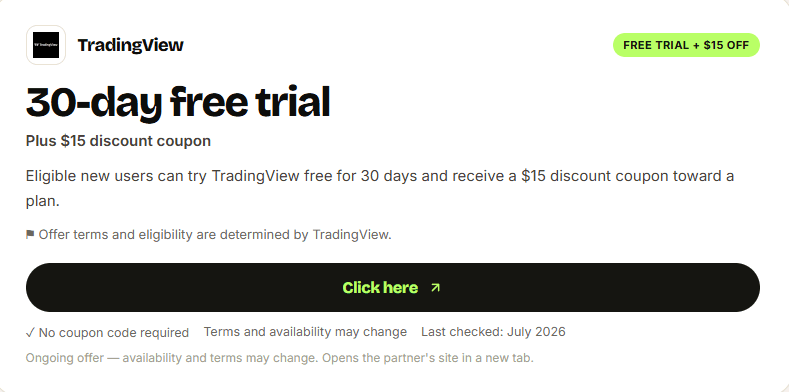
If you want to test a paid plan before committing, visit the WorthTheCart TradingView coupon page. It gives eligible users access to a 30-day free trial and a $15 discount coupon toward a TradingView plan. The trial is a good opportunity to build your normal chart layout, create alerts, and compare Essential, Plus, and Premium using your actual routine. Check the current terms before subscribing, as eligibility, plan availability, and promotional offers can change.
Charts Per Tab
Charts per tab are one of the most important plan differences.
One chart is enough for learning. Two charts make multi-timeframe comparison practical. Four charts create a serious workflow. Eight or 16 charts matter mainly for active and multi-screen users.
This is the main reason I prefer Plus for regular users.
Alerts
Alerts can save more time than indicators.
A price alert lets you define the level that matters and leave the screen. Technical alerts can monitor conditions involving indicators, drawing tools, strategies, or chart patterns.
The value is not receiving more notifications. It is receiving only the notifications connected to a plan you have already defined.
Indicators Per Chart
The jump from two to five indicators is meaningful. The jump from 25 to 50 is irrelevant to most people.
A chart containing too many indicators can become unreadable and encourage conflicting signals. Higher limits are useful for flexibility and specialized analysis, but they should not be treated as a target.
The best number of indicators is the smallest number that supports a clear process.
Historical Bars
Historical data becomes important for research, Bar Replay, and strategy testing.
Basic includes 5,000 historical bars, Essential and Plus include 10,000, Premium provides 20,000, and Ultimate increases the limit to 40,000.
A casual investor may rarely notice the difference. A user testing a strategy across different market periods may value it substantially.
Ad Removal
Removing advertisements sounds less important than increasing chart limits, but it improves every session.
A cleaner workspace makes it easier to focus on the chart, particularly on a laptop or smaller display. Essential is the cheapest plan that creates that more professional experience.
Paper Trading on TradingView
Paper trading on TradingView is available to all users, including the free Basic plan.
It is a simulated account that lets you practice buying and selling with virtual funds instead of depositing real money. TradingView describes it as a way to test skills and analysis under conditions designed to resemble real markets. TradingView’s paper-trading guide
To begin:
Open TradingView Supercharts.
Select the Trade button.
Choose Paper Trading from the available connections.
Connect the simulated account.
Place virtual orders through the chart or order panel.
This is valuable for beginners because it makes the mechanics of placing orders less intimidating. You can learn how market, limit, stop, and stop-limit orders behave without risking real money.
It is also useful for experienced users exploring a new strategy. An idea that looks convincing on a finished historical chart may feel very different when decisions must be made one bar at a time.
Paper trading has limitations. Virtual losses do not create the same emotional pressure as real losses, and simulated executions may not perfectly reproduce slippage, liquidity, or live order fills.
It should be treated as a practice environment rather than proof that a strategy will be profitable.
The important point for this review is that you do not need a paid subscription to begin paper trading. Upgrade when chart, alert, indicator, or historical-data limits become the problem—not because you think payment makes the simulator more realistic.
TradingView Desktop, App, and Download Options
TradingView can be used through a browser, desktop application, and mobile app.
TradingView Web
The web version is the easiest place to start. Sign in through a normal browser and your layouts, watchlists, and account settings remain connected to your profile.
There is nothing to install, making it ideal for trying the free plan or opening a chart on another computer.
TradingView Desktop
The TradingView desktop application is better suited to a dedicated workstation.
TradingView says the desktop app supports synchronized tabs, customizable layouts, multiple windows, and multi-monitor configurations. Users can open a separate app window for each display. TradingView’s desktop overview
This is particularly useful with Plus, Premium, or Ultimate because those plans allow more charts and parallel connections.
The TradingView download is available for supported Windows, macOS, and Linux systems. Check the latest system requirements before installation, particularly if you use an ARM-based or older computer.
TradingView App
The TradingView app is available for mobile devices and is most useful for checking charts, managing watchlists, and receiving alerts away from a computer.
A phone screen is not ideal for building an eight-chart technical workspace. Its strength is continuity. You can create an alert on a desktop and receive the notification through the mobile app later.
This creates a sensible workflow:
Use desktop or web for detailed analysis
Use mobile for watchlists and alerts
Allow account synchronization to keep the workspace connected
The Hidden Cost: Real-Time Market Data
The most easily overlooked TradingView cost is exchange data.
Paying for Essential, Plus, Premium, or Ultimate does not automatically include every exchange’s official real-time market feed.
TradingView states that many stock and futures exchanges charge separate fees for real-time data, and those fees are not covered simply because you have a paid TradingView plan. Cryptocurrency exchange data is generally available in real time, while other markets may be delayed or provided through a different feed. TradingView’s market-data explanation
For U.S. stocks, TradingView provides Cboe data by default. Users who require direct real-time feeds from exchanges such as NASDAQ, NYSE, or ARCA may need an additional data subscription.
This does not make the paid plans misleading. Market-data licensing is a separate cost across many financial platforms. It simply needs to be included in your budget.
Before upgrading:
Open the market or ticker you actually use.
Check whether TradingView labels the data as delayed.
Identify the exchange supplying the symbol.
Check whether your broker can verify an existing data subscription.
Add the exchange fee only if your workflow requires it.
TradingView says some users who already pay for data through a supported broker may be able to verify the broker account and access that data without paying twice. TradingView’s broker-data verification guide
Sales tax can also be added depending on location. Professional subscribers may face much higher exchange-data fees than non-professional users.
Monthly vs Annual Billing: Which Is Better?
Annual billing offers the lowest normal rate for every paid plan:
Plan | Monthly Billing for One Year | Annual Payment | Annual Saving |
Essential | $179.40 | $155.40 | $24 |
Plus | $419.40 | $359.40 | $60 |
Premium | $839.40 | $719.40 | $120 |
Ultimate | $2,879.40 | $2,399.40 | $480 |
Annual billing makes sense when you already use TradingView regularly and know which plan fits your routine.
Monthly billing is safer if you are still uncertain. Paying a slightly higher price for one month can be cheaper than purchasing an entire year of a plan you stop using.
The best approach is:
Begin with Basic.
Identify the exact limit causing frustration.
Use the free trial for the plan that removes it.
Build your real chart and alert workflow during the trial.
Downgrade or cancel if the extra features do not change how you use the platform.
Choose annual billing only after the plan proves useful.
The WorthTheCart TradingView coupon page provides access to a 30-day free trial for eligible plans and a $15 discount coupon toward the subscription. Ultimate normally advertises a shorter 14-day trial, so confirm the exact trial shown before checkout.
Which TradingView Plan Should You Choose?
Complete Beginners
Start with Basic.
Learn how charts, watchlists, indicators, alerts, and paper trading work before paying. Upgrade when the free limits become a genuine inconvenience.
Long-Term Investors
Choose Basic or Essential.
Basic is enough for occasional research. Essential is worthwhile if you follow several companies, want more alerts, need multiple watchlists, or prefer an ad-free interface.
Swing Traders
Choose Plus.
Four charts allow several timeframes to remain visible, while 100 price and technical alerts provide enough capacity for a meaningful watchlist.
Active Traders
Choose Plus or Premium.
Plus offers the best value. Premium becomes worthwhile when you need eight charts, hundreds of alerts, longer historical datasets, watchlist alerts, or second- and tick-based intervals.
Professional or Highly Demanding Users
Choose Ultimate.
The plan is built for large multi-screen layouts, very high alert limits, deep history, and professional eligibility. It is unnecessary for nearly everyone else.
TradingView Pros and Cons
Reasons to Choose TradingView
Excellent interactive charts
Useful free plan
Clear upgrades for different experience levels
Strong desktop, web, and mobile support
Wide market coverage
Large selection of built-in and community indicators
Custom Pine Script tools
Powerful price and technical alerts
Paper trading available without a paid plan
Broker integrations
Multi-chart and multi-monitor support
Watchlists and screeners
Bar Replay and strategy-testing tools
Paid plans remove advertisements
30-day trial on Essential, Plus, and Premium
Plus offers an excellent balance of price and capability
Reasons to Avoid or Delay Upgrading
Annual plans require a large upfront payment
Official real-time exchange data may cost extra
Sales tax may be added
The number of plans can feel confusing
Basic allows only one chart and two indicators
Advanced plans can be unnecessary for casual users
More indicators do not automatically improve decisions
Paper trading cannot fully reproduce live trading
Ultimate is expensive
A paid plan cannot guarantee profitable results
Final Verdict: Is TradingView Worth It in 2026?
Yes, TradingView is worth it in 2026—but the right plan depends on how often you use charts and which free-plan limit gets in your way.
The free Basic plan is one of the strongest reasons to recommend the platform. It gives beginners enough access to learn charting, build watchlists, create several alerts, and practice through paper trading without making an immediate financial commitment.
Essential is the best-value paid plan. At $12.95 per month with annual billing, it removes advertisements, supports two charts per tab, allows five indicators per chart, and increases price and technical alerts to 20 each. It is the right first upgrade for beginners, long-term investors, and casual swing traders.
Plus is the best overall TradingView plan. Four charts, 10 indicators, and 100 price and technical alerts create enough room for a serious workflow without the much higher cost of Premium. For someone regularly analyzing several timeframes, the upgrade can reduce enough repetitive switching to justify the price.
Premium is the strongest choice for serious active traders who already know they need eight charts, hundreds of alerts, watchlist monitoring, longer history, or second- and tick-based intervals.
Ultimate should be reserved for professional and exceptionally demanding users. Its features are impressive, but most people will never come close to its limits.
The most important trade-off is simple: higher plans create more capacity, but unused capacity has no value. Do not pay for 400 alerts because the number sounds professional. Pay because your existing 100-alert limit is holding back a real process.
For the central WorthTheCart question—does this product make daily life noticeably easier enough to justify adding another subscription?—TradingView earns a confident yes when the plan matches the user.
Best free choice: Basic
Best-value paid plan: Essential
Best overall plan: Plus
Best for serious active traders: Premium
Best for professionals: Ultimate
Overall TradingView score: 9.3/10
Start with the TradingView 30-day trial and $15 discount coupon, then use the trial period to discover whether Essential, Plus, or Premium genuinely improves your workflow before selecting annual billing.
6. FAQ
Is TradingView free?
Yes. TradingView Basic is free and includes one chart per tab, two indicators per chart, 5,000 historical bars, one watchlist, three active price alerts, screeners, and access to paper trading.
The free plan is suitable for beginners and occasional investors.
Is TradingView worth paying for?
TradingView is worth paying for when the Basic plan’s chart, indicator, alert, or watchlist limits interfere with your workflow.
Essential is the most affordable serious upgrade, while Plus offers the best combination of charts, indicators, and alerts for regular users.
Which TradingView plan is best?
TradingView Plus is the best overall plan for most active users. It includes four charts per tab, 10 indicators per chart, 100 price alerts, 100 technical alerts, and 20 parallel chart connections.
Essential is the best value for beginners and casual users.
Is TradingView Premium worth it?
Premium is worth it for active traders who need eight charts per tab, 25 indicators, 400 price and technical alerts, watchlist alerts, longer historical data, or second- and tick-based intervals.
Plus remains the better value if you do not need those higher limits.
Does TradingView include real-time market data?
Some TradingView data is available in real time, but many stock and futures exchanges charge separately for official real-time feeds.
A paid TradingView plan does not automatically include every exchange’s real-time data. Check the specific market and exchange before subscribing.
Is paper trading on TradingView free?
Yes. Paper trading is available to all TradingView users, including Basic accounts.
It allows users to practice with virtual money rather than risking a real deposit.
Can you trade directly through TradingView?
Yes, if you have an account with a supported broker available in your region. Open Supercharts, select Trade, choose the broker, and sign in.
TradingView also offers its own simulated Paper Trading connection.
Is TradingView Desktop better than the browser?
The desktop application is better for multi-monitor setups, multiple windows, and a dedicated analysis workspace. The web version is more convenient when using different computers or avoiding an installation.
Both connect to the same TradingView account.
Can TradingView guarantee better trading results?
No. A paid plan provides additional tools, charts, alerts, and data capacity, but it cannot guarantee profit or remove market risk.
Its value comes from improving organization and efficiency.
Keep reading


