Business Tools
·
1 products compared
Last updated
9.7
⭐ Best Value Pick
Shopify Basic plan for new online stores
Shopify Review
Affiliate disclosure: WorthTheCart may earn a commission from qualifying purchases. This does not affect our editorial opinions, rankings, or recommendations.


Starting an online store sounds simple until you actually try to do it.
At first, it feels like you only need a product and a website. Then you realize the website needs product pages, checkout, payment processing, shipping settings, inventory, taxes, email notifications, analytics, discount codes, mobile design, customer accounts, abandoned cart recovery, SEO settings, apps, policies, and a way to actually manage orders once people start buying.
That is where Shopify becomes interesting.
Shopify is not just a website builder. It is a commerce platform built around selling. That difference matters. A normal website builder can help you make pages. Shopify helps you make a store. It gives you the foundation to list products, accept payments, manage orders, connect sales channels, track inventory, build customer trust, and run the business side of ecommerce from one place.
That is why so many people use Shopify for online stores. It removes a lot of the technical friction that usually stops people from starting. You still need a good product, good branding, good photos, traffic, and a reason for customers to buy. Shopify does not solve those parts for you. But it does make the store-building part much easier than trying to connect everything yourself.
For this WorthTheCart review, I am looking at Shopify as a real business tool. Not just whether it looks good in ads, but whether it actually helps someone start and run an online store in a practical way.
WorthTheCart Rating: 9.7/10
What Is Shopify?
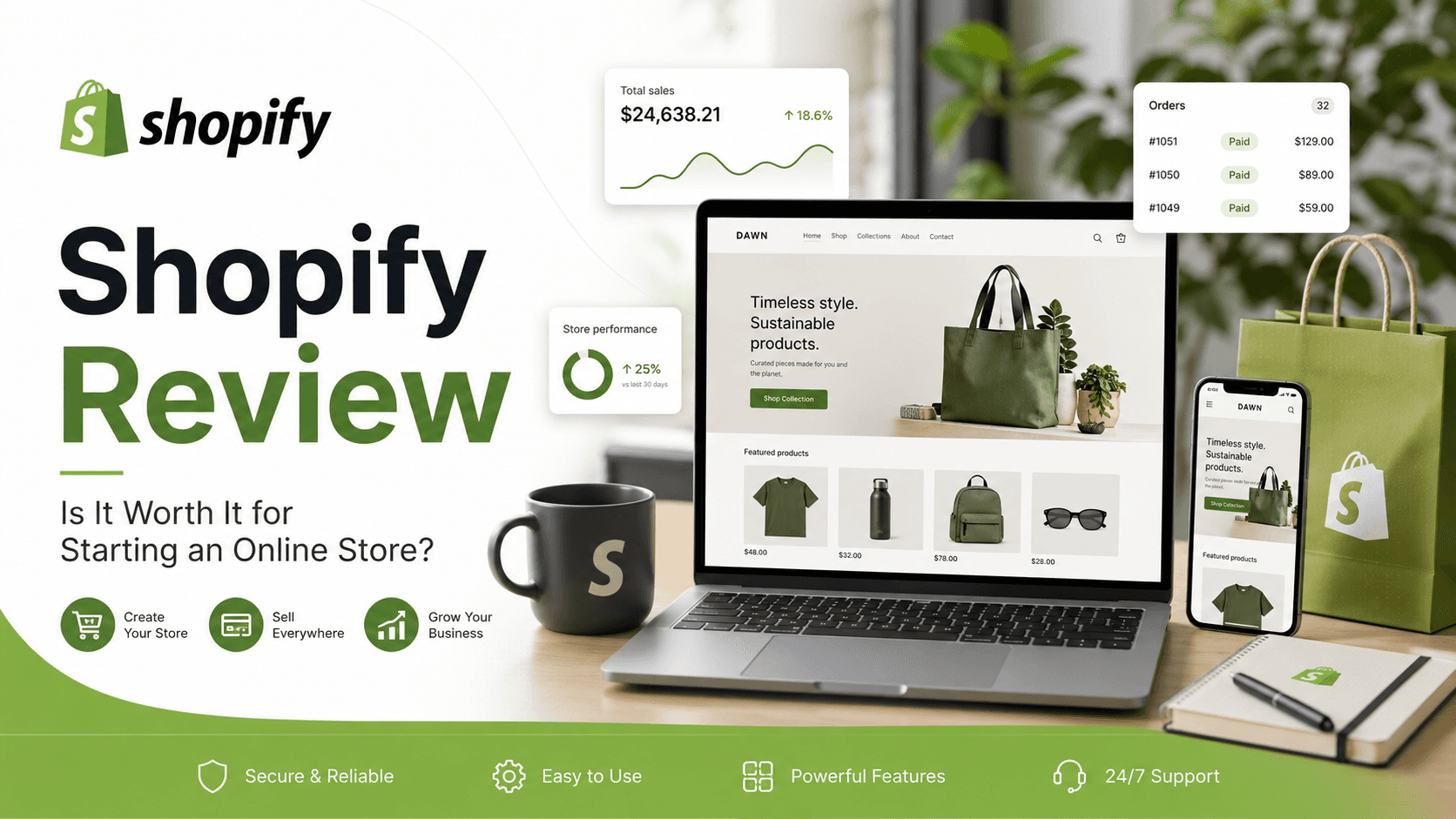
Shopify is an all-in-one commerce platform for building and running an online store. You can use it to create a storefront, upload products, manage orders, accept payments, sell through different channels, and connect extra tools through apps. Shopify describes itself as an all-in-one commerce platform with tools to manage different parts of a business, not just the public website.
The simplest way to explain it is this: Shopify gives you the system behind an online business.
Your customer sees the front end: the homepage, product photos, product descriptions, cart, checkout, and order confirmation page. You see the back end: your product list, inventory, orders, customers, discounts, analytics, shipping settings, themes, apps, and marketing tools.
That back end is where Shopify becomes valuable. A good-looking website is only one part of ecommerce. The real challenge is keeping the store working after launch. You need orders to come through correctly. You need payments to process. You need stock to update. You need customers to get email confirmations. You need your checkout to feel trustworthy. You need your store to work on mobile. You need to make changes without breaking the whole site.
Shopify puts those pieces into one dashboard.
That is why it is useful for beginners. You do not need to understand hosting, databases, payment gateways, checkout security, or custom ecommerce development just to start selling. You can focus more on the business itself: what you sell, how you present it, who you sell it to, and how you get traffic.
What Can Shopify Be Used For?
Shopify can be used for many different types of online businesses, but it is strongest when you are selling something that needs a real checkout.
That can be physical products, digital products, print-on-demand items, handmade goods, beauty products, clothing, accessories, home products, supplements, coffee, art prints, phone cases, fitness gear, pet products, or almost any product-based store. It can also be used by creators who want to sell merch, small businesses that want to sell online, and local shops that want to connect online and in-person sales.
Shopify is especially good if you want to build a brand around your products. Amazon is good for marketplace discovery, but the customer belongs more to Amazon than to you. A Shopify store gives you more control over the brand experience. You control the homepage, product pages, email capture, colors, product descriptions, bundles, landing pages, policies, and overall feeling of the store.
You can also use Shopify for dropshipping, although dropshipping is not as easy as many people online make it sound. Shopify can provide the store infrastructure, but the product research, supplier quality, shipping times, ad costs, customer service, and brand trust still matter. Shopify makes dropshipping possible; it does not make bad products good.
Print-on-demand is another common use. A creator can connect a print-on-demand app, upload designs, and sell shirts, hoodies, mugs, posters, or other custom products without holding inventory. Again, the platform makes the setup easier, but the brand and design still need to be strong.
Shopify can also work for digital products. Depending on the setup, sellers can use apps to deliver downloads, templates, guides, files, ebooks, presets, or other digital items. This makes it useful for creators, photographers, designers, educators, and small online businesses that do not want to ship physical products.
For retail stores, Shopify can also be used in person through Shopify POS. Shopify POS Lite is listed as included with Shopify plans, while POS Pro is available for more advanced retail features and is priced separately per location. That matters if you sell both online and in real life, because your store, orders, customers, and inventory can be managed more closely in one system.
(Image explanation: Create a visual showing different Shopify use cases around one central Shopify logo: online store, clothing brand, beauty products, print-on-demand merch, digital downloads, local retail shop, and social media selling.)
Why Shopify Is So Popular
The biggest reason Shopify is popular is not because it is the cheapest option. It is popular because it makes ecommerce feel manageable.
There are many ways to build an online store. You can use WordPress with WooCommerce. You can use Wix. You can sell on Etsy. You can sell on Amazon. You can build something custom. Each option has a place.
Shopify’s advantage is that it is built specifically for commerce. The product pages, checkout, payment system, shipping settings, inventory tools, order management, and app ecosystem all revolve around selling. That makes the platform feel more serious than a normal website builder when your main goal is to run a store.
For a beginner, this matters because you do not want to spend all your energy figuring out technical setup before you even know whether your product can sell. Shopify lets you get a real store online faster. You can choose a theme, add products, connect payments, set up shipping, publish pages, and start testing.
For a growing brand, it matters because Shopify can scale beyond the first few orders. A small store can start simple and add more tools later: email marketing, subscriptions, loyalty programs, upsells, product reviews, bundles, advanced analytics, international selling, wholesale, and more.
The Shopify App Store is a major part of that. Shopify says its App Store has over 16,000 apps for customizing and growing a store, covering areas like marketing, store design, fulfillment, and more. This means you are not locked into only the built-in features. You can add tools when your store needs them.
That flexibility is one of Shopify’s best qualities. You can start with a simple store and grow into something more advanced without rebuilding from zero.
The Best Thing About Shopify: It Reduces Friction
The best thing about Shopify is that it reduces friction.
That may not sound exciting, but it is one of the most important things in ecommerce.
Friction is what stops people from launching. Friction is spending three days trying to connect a payment gateway. Friction is not knowing how to make checkout secure. Friction is breaking your website because you changed the wrong setting. Friction is realizing your product pages look bad on mobile. Friction is manually updating inventory in five places. Friction is trying to figure out why customers cannot complete checkout.
Shopify does not remove every problem, but it removes a lot of the early technical ones. That gives you more room to work on the things that actually grow the business.
You can spend more time improving product photos. You can write better product descriptions. You can test offers. You can build social media content. You can create landing pages. You can improve your homepage. You can talk to customers. You can run ads. You can send emails. You can study analytics.
That is the real value of Shopify.
It does not make the business easy. It makes the technical foundation less painful.
(Image explanation: Show a split image. On the left, a messy desk with code, server icons, payment setup, and broken checkout warnings. On the right, a clean Shopify setup with products, orders, and checkout working smoothly. The visual should explain that Shopify removes technical friction.)
Store Design and Themes
Shopify gives you a way to build a professional-looking store without designing every page from scratch.
Themes are one of the main reasons beginners can get started quickly. You can choose a theme, customize colors and fonts, add sections, upload product photos, and build a store that looks clean enough to launch. You do not need to be a designer to make something usable.
That said, design still matters.
A Shopify theme is not automatically a good brand. A store can use Shopify and still look generic. The difference comes from the details: product photography, homepage structure, copywriting, trust sections, reviews, FAQ, navigation, spacing, and how clearly the store explains what it sells.
The best Shopify stores usually feel simple. They do not overload the visitor with too much text, too many popups, or too many random products. They make the offer clear. They show the product well. They explain why it matters. They make checkout easy.
That is where Shopify helps. It gives you the structure, but you still need taste.
For a beginner, I would not worry about making the perfect design on day one. I would focus on making the store clear. A homepage should quickly answer what the store sells, who it is for, why it is useful, and what the customer should do next. Product pages should have strong images, clear benefits, shipping information, return policy, and enough detail to reduce doubt.
Shopify makes those pages easier to build, but the quality of the content still decides how good the store feels.
Product Pages Matter More Than People Think
A lot of new store owners spend too much time on the homepage and not enough time on the product page.
The product page is where the buying decision happens. A customer may arrive from Google, TikTok, Pinterest, Instagram, YouTube, an ad, or a product link and land directly on one product. If that page is weak, the rest of the store does not matter much.
Shopify gives you a solid product page structure. You can add product title, price, images, variants, descriptions, shipping information, and more depending on your theme and apps. But the default page is only the starting point.
A good product page should explain the product like a helpful salesperson would. Not with hype, but with clarity.
What is it?
Who is it for?
What problem does it solve?
What makes it different?
What is included?
How big is it?
How does it feel in real life?
When would someone use it?
Why should they trust it?
What happens after they order?
Those answers matter because online shoppers cannot hold the product. They cannot touch the fabric, test the size, smell the candle, try the coffee, or see the build quality in person. Your product page has to do that work for them.
This is one of the reasons Shopify is worth using: it gives you the product system, but it also gives you room to improve the page over time. You can start with a simple product page and later add reviews, comparison charts, videos, bundles, upsells, size guides, FAQ sections, trust badges, and better product images.
Checkout and Payments
Checkout is one of the most important parts of an online store. A store can have great products and still lose sales if checkout feels slow, confusing, or untrustworthy.
This is an area where Shopify is strong. Shopify has spent years building a checkout experience designed for ecommerce. That matters because checkout is not just a form. It is the moment where the customer decides whether they trust you enough to pay.
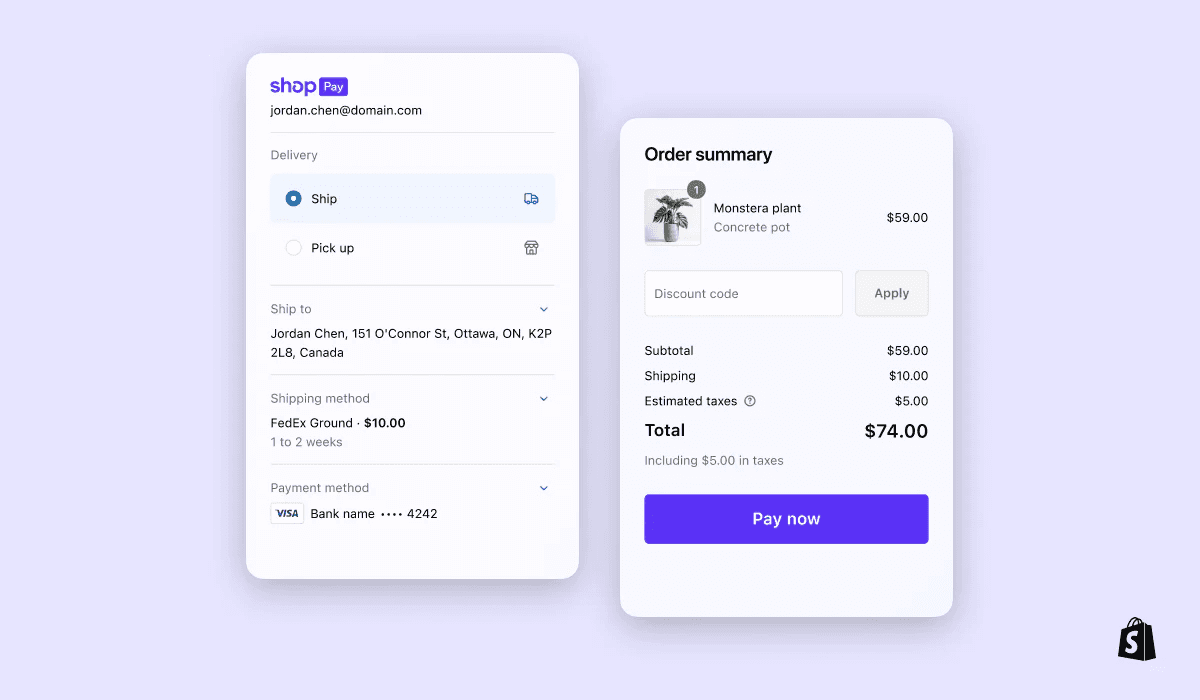
Shopify Payments lets eligible stores accept payments directly through Shopify, and Shopify states that stores using Shopify Payments are not charged third-party transaction fees for orders processed through Shopify Payments, Shop Pay, Shop Pay Installments, and some other supported methods.
Shop Pay is another advantage. It is Shopify’s accelerated checkout, and Shopify’s help documentation explains that Shop Pay supports credit and debit cards as well as local payment methods processed by Shopify Payments.
For a small store, this can make a difference because trust and speed matter at checkout. Customers are used to fast, familiar checkout flows. If your store feels strange or insecure, some people will leave before buying.
Of course, payment availability, rates, and features can vary depending on location, plan, payment method, and eligibility. That is why it is always important to check Shopify’s current pricing and payment information before launching. Shopify’s pricing pages and help docs explain that plans, fees, and billing details vary by plan and region.
Inventory and Order Management
A store is not finished when someone places an order. That is when the operational side begins.
You need to know what was ordered, who bought it, where it needs to go, whether payment was captured, whether the item is in stock, whether the customer received confirmation, and whether the order has been fulfilled.
Shopify’s order management system is one of the reasons it is useful beyond just store design. You can see orders in the dashboard, update fulfillment status, manage customer information, create discounts, track inventory, and connect fulfillment or shipping apps depending on how your business works.
For a small store, this keeps things organized. For a growing store, it becomes even more important. Once orders increase, manual tracking becomes messy fast. You do not want to manage real sales from scattered notes, emails, and spreadsheets if you can avoid it.
Shopify becomes the central place where the store lives.
That is also useful for customer service. If someone emails asking where their order is, you need to find the order quickly. If someone wants to change an address, return a product, or ask about a discount, you need the information in one place. The more organized the backend is, the easier it is to run the store without feeling overwhelmed.
Apps and Customization
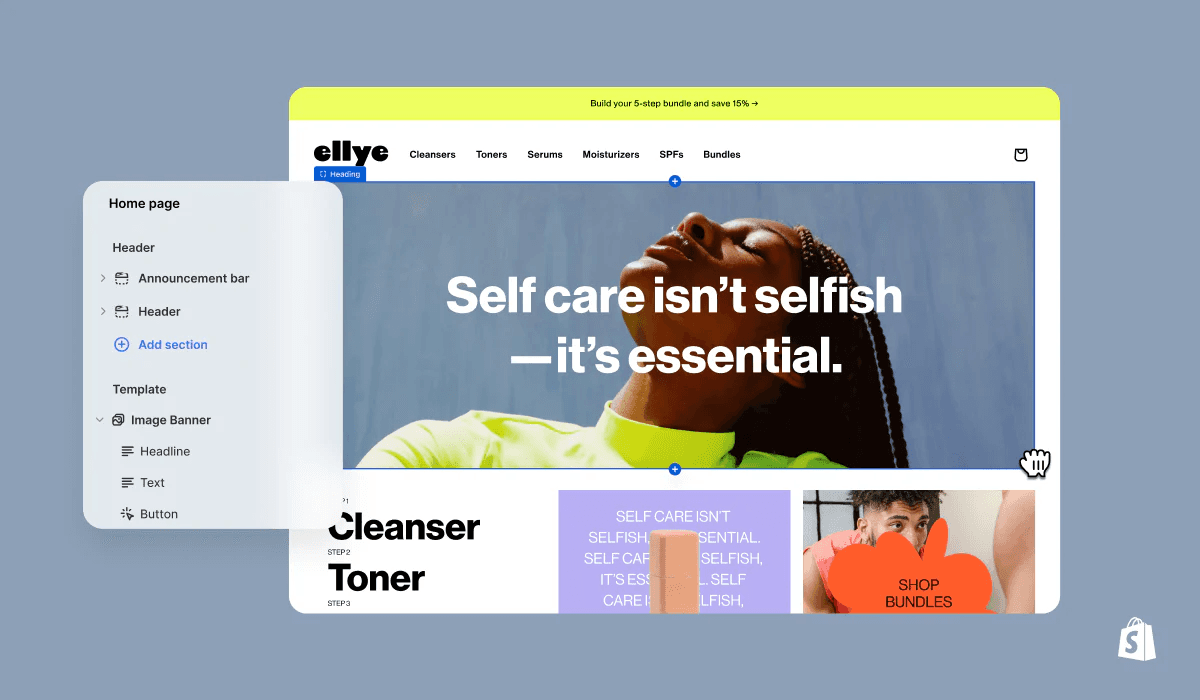
One of Shopify’s biggest strengths is the app ecosystem.
No ecommerce platform can include every feature every business might need. A clothing store, coffee brand, supplement company, digital product store, jewelry brand, print-on-demand shop, and local retail business all need different tools.
Shopify solves a lot of that through apps.
You can add apps for reviews, subscriptions, email marketing, upsells, bundles, loyalty programs, landing pages, digital downloads, print-on-demand, dropshipping, shipping, customer support, analytics, SEO, translations, popups, affiliate programs, and more.
This is powerful because it lets your store grow in stages. You do not need every advanced feature on day one. In fact, adding too many apps too early can slow you down and make the store feel messy. A better approach is to start with the basics, then add apps when there is a real reason.
For example, a new store may only need a clean theme, payment setup, product reviews, email capture, and basic analytics. Later, if sales start coming in, it may make sense to add bundles, upsells, subscriptions, advanced email flows, or loyalty rewards.
The downside is cost. Some apps are free, but many useful apps charge monthly fees. This is one of the hidden parts of Shopify pricing that beginners should understand. The base plan is not always the full cost of running the store. Your real cost may include the Shopify plan, paid theme, apps, domain, email tools, product costs, shipping materials, marketing, and transaction-related fees depending on setup.
That does not make Shopify bad. It just means you should build carefully. Use apps because they solve a real problem, not because they look exciting.
(Image explanation: Show a Shopify store in the center with app icons around it: reviews, email marketing, subscriptions, shipping, analytics, print-on-demand, SEO, and customer support. The image should explain that Shopify can be expanded through apps.)
Shopify and AI Tools
AI is becoming a bigger part of ecommerce, and Shopify has been adding AI-powered tools into its platform.
Shopify Magic is Shopify’s suite of free AI-powered features built into Shopify products and workflows. Shopify describes it as helping with tasks across store building, marketing, customer support, and back office management.
For beginners, this can be genuinely useful. Writing product descriptions is harder than it looks. A bad product description either says too little or sounds like generic advertising. AI tools can help create a starting point, especially if you are uploading many products.
AI can also help with email copy, FAQ content, product descriptions, and general store tasks. It will not replace good judgment, but it can reduce the blank-page problem.
The important thing is to edit the AI output. A store should not sound like every other AI-generated store. The best use of AI is not to let it write everything untouched. The best use is to speed up rough drafts, then rewrite them with your brand voice, product knowledge, and customer understanding.
This is especially important for product descriptions. AI can help you explain features, but you still need to make the product feel real. You should include details customers care about: size, use case, feel, material, compatibility, care instructions, what is included, and why the product is worth buying.
Used well, Shopify’s AI features can save time. Used lazily, they can make your store sound generic.
Selling Internationally With Shopify
Another reason Shopify is powerful is that it can support stores that want to sell beyond one country.
Shopify Markets is designed to help merchants manage multiple markets from one store, including international and cross-border selling. Shopify describes Markets as a way to sell to multiple markets from a single store and manage those markets in one place.
For a small store, international selling may not matter on day one. In fact, many new stores should focus on one main market first. Shipping, taxes, duties, delivery times, returns, and customer expectations become more complicated when you sell internationally.
But it is still useful that Shopify has tools for growth. If a store starts in one country and later gets international demand, it is better to have a platform that can grow with that goal.
International features can matter for brands selling products with global appeal: clothing, accessories, digital products, beauty, collectibles, home decor, fitness products, creator merch, and niche items. If people from different countries are finding your brand through TikTok, Pinterest, YouTube, Instagram, or SEO, having a platform that can handle expansion becomes valuable.
(Image explanation: Show a Shopify store on a laptop with global map lines connecting to different countries, with small symbols for currencies, languages, shipping, and international checkout.)
Shopify for In-Person Selling
Shopify is not only for online stores.
If you sell at markets, pop-ups, fairs, events, or in a physical shop, Shopify POS can help connect in-person selling with your online business. This is important because many small brands do not sell in only one place. A clothing brand might sell online and at pop-up events. A coffee brand might sell on its website and at local markets. A handmade jewelry seller might sell through Instagram, a Shopify store, and weekend booths.
When online and offline sales are disconnected, inventory gets messy. You might sell the same item in person and forget to update the online stock. Or you might have customer information in different places. Or you might struggle to understand total sales because everything is split across systems.
Shopify POS helps bring those sales closer together. Shopify POS Lite is listed as included with Shopify plans, while POS Pro is available for more advanced retail setups.
This makes Shopify especially useful for small brands that want to feel more professional. You can start online, then sell at a local event, then later open a physical location if the business grows. The same platform can support more than one stage of the business.
Marketing and SEO
Shopify gives you tools to build a store, but it does not automatically bring customers.
This is one of the biggest misunderstandings beginners have. A Shopify store is not a traffic machine by itself. You still need marketing.
That can mean SEO, TikTok, Pinterest, Instagram, YouTube, email marketing, paid ads, influencer partnerships, product reviews, blog content, affiliate marketing, or community building. The platform helps you present and process the sale, but you still need people to visit the store.
Shopify can help with marketing because it gives you product pages, collections, blog posts, metadata, discount codes, analytics, email tools, and app integrations. But the strategy still matters.
For SEO, Shopify can work well if you build the store properly. Product titles should be clear. Collection pages should target real search terms. Blog posts should answer questions customers actually search for. Product descriptions should be original and useful. Image alt text should describe the product. The store should load well, work on mobile, and avoid thin duplicate content.
For social media, Shopify works best when the product is easy to understand visually. Clothing, beauty, home products, gadgets, accessories, decor, coffee, fitness items, and giftable products can all work well if the content is strong.
For email marketing, Shopify is useful because you can collect emails, send campaigns, recover abandoned carts depending on setup, and build customer relationships over time.
The key is that Shopify gives you the store. Marketing gives people a reason to visit it.
(Image explanation: Show a Shopify store in the center with traffic sources around it: Google, Pinterest, TikTok, Instagram, YouTube, email, and ads. The image should explain that Shopify is the store, but marketing brings the visitors.)
Shopify for Beginners
For beginners, Shopify is one of the best platforms because it lets you start without needing to become a developer first.
That does not mean there is no learning curve. There is still a lot to learn: products, suppliers, shipping, branding, store design, product pages, customer service, analytics, taxes, policies, and marketing. But Shopify makes the technical store setup much more approachable.
A beginner can start with a simple store and improve it over time. That is important because many people wait too long trying to make the perfect store before launching. In reality, the first version of a store is usually not perfect. You learn by publishing, watching what visitors do, improving product pages, testing offers, and getting feedback.
The best beginner Shopify store is not the one with the most apps or the fanciest theme. It is the one that is clear, trustworthy, and focused.
A good beginner setup might include a clean homepage, a small number of products, strong product photos, clear product descriptions, shipping information, return policy, contact page, about page, FAQ, and a simple email signup. That is enough to start testing.
Over time, you can add more: reviews, bundles, blog content, better photography, landing pages, ads, email flows, upsells, and more advanced analytics.
Shopify is good for beginners because it gives you a serious foundation without forcing you to master everything at once.
Shopify for Growing Brands
Shopify is not only a beginner tool.
One of the reasons it scores so highly is that it can grow with a business. A lot of platforms are easy at the start but limiting later. Shopify is strong because it can support simple stores and more advanced commerce operations.
A growing brand may need better inventory management, more staff access, more apps, better reports, international selling, retail POS, custom themes, advanced fulfillment, B2B features, automation, or Shopify Plus. Shopify’s pricing and help pages show that different plans offer different levels of features, rates, and capabilities, so stores can move up as their needs become more advanced.
This matters because switching ecommerce platforms later can be painful. Moving products, customer data, order history, URLs, SEO structure, theme design, apps, and checkout setup is not something most store owners want to do often.
Starting on a platform that can grow with you is valuable.
That does not mean every store needs advanced Shopify features. Many stores can stay simple for a long time. But it is good to know the platform is not only for tiny stores. It can support more serious commerce if the business grows.
The Downsides of Shopify
Shopify is excellent, but it is not perfect.
The first downside is cost. Shopify is a paid platform, and your real cost can increase as your store becomes more advanced. The plan is only one part of the expense. Apps, themes, domains, email marketing, subscriptions, custom development, product costs, and marketing can all add up.
The second downside is that some features may require apps. Shopify covers the core ecommerce foundation well, but specialized features often need add-ons. If you want advanced subscriptions, complex product options, custom bundles, booking systems, digital delivery workflows, wholesale setups, or advanced landing pages, you may need extra tools.
The third downside is that design freedom has limits unless you use custom development. Shopify themes are flexible, but they are still theme-based. If you want a highly custom editorial layout, unusual animations, or a design that behaves nothing like a typical store, you may need a developer or a more design-focused platform.
The fourth downside is that Shopify does not solve product-market fit. This is important. A good platform cannot save a weak product. If the product is not interesting, the offer is unclear, the photos are poor, or the marketing is weak, the store will struggle no matter what platform you use.
The fifth downside is that beginners can get distracted by apps and design too early. Because Shopify has so many options, it is easy to spend time adding features instead of improving the offer. A simple store with a strong product is usually better than a complicated store with no clear reason to buy.
These downsides do not ruin Shopify. They just make it important to use the platform correctly.
Who Should Use Shopify?
Shopify is best for people who want to sell products online and want a platform built specifically for commerce.
It makes sense for a solo founder testing a product idea. It makes sense for a small business that wants to stop relying only on social media DMs. It makes sense for a creator selling merch. It makes sense for a local shop that wants to sell online. It makes sense for a brand that wants control over its own website instead of only selling through marketplaces.
It is also a strong choice for people who want to move quickly. You can spend months trying to build the perfect custom website, or you can start with Shopify and improve as you go. For many businesses, speed matters. Getting real customer feedback is more useful than endlessly planning a store that no one has visited yet.
Shopify is also good for people who want a clean backend. If you like having products, orders, payments, customers, discounts, inventory, and analytics in one place, Shopify feels organized.
Who Should Not Use Shopify?
Shopify is not the best fit for everyone.
If you only need a simple personal blog, portfolio, or content website, Shopify is probably more ecommerce-focused than you need. A platform like Framer, WordPress, Webflow, or another site builder may make more sense for pure content.
If you want a completely custom website with unusual design and no real ecommerce needs, Shopify may feel restrictive.
If you are trying to start with zero budget, Shopify may also feel difficult because it is a paid platform after the trial. You can test ideas in cheaper ways first, but if you want a real checkout and store system, you should expect ongoing costs.
If you dislike monthly software costs, app fees, and platform-based systems, WooCommerce or a custom setup may be more appealing. But those options usually require more technical management.
Shopify is best when you actually want to sell and manage products. If selling is not the main goal, it may be too much.
Shopify Pricing: What to Know Before Starting
Shopify pricing depends on plan, country, billing cycle, payment setup, and current offers. Shopify’s official pricing page lists plan options and trial offers, while Shopify’s help center explains that plans can include different fees, rates, and billing details depending on region and setup.
For a new store, the most important thing is not choosing the most expensive plan. The most important thing is choosing a plan that lets you launch properly without overcomplicating the business.
Most beginners should start simple. Build the store, test the product, improve the pages, and see if people actually want to buy. There is no reason to pay for advanced features before you know what you need.
As the store grows, upgrading can make more sense. More advanced plans can offer better reporting, more advanced tools, different rates, or features that matter once the business has real volume.
The real pricing lesson is this: do not only look at the monthly plan. Think about the full store cost. That includes the Shopify plan, domain, apps, theme, email tools, product costs, shipping supplies, marketing, and any professional help you need.
Shopify is worth paying for if it helps you launch, operate, and grow more smoothly. It is not worth it if you pay for it but never build the store properly.
How I Would Build a Shopify Store From Scratch
If I were starting a Shopify store from zero, I would not begin by installing twenty apps or spending weeks on the logo.
I would start with the offer.
What am I selling?
Who is it for?
Why would someone buy it from this store instead of somewhere else?
What problem does it solve?
What makes it worth the price?
Can I explain it clearly in one sentence?
After that, I would build a simple store structure.
The homepage would explain the brand quickly. The product page would do most of the selling. The about page would make the store feel real. The FAQ would answer shipping, returns, sizing, delivery, and product questions. The contact page would make it easy to reach the business. The policy pages would create trust.
Then I would focus on product photos. Good photos make a bigger difference than most beginners think. A weak product photo makes even a good product feel cheap. A strong product photo can make the whole store feel more trustworthy.
After that, I would write the product page like a real person. Not too much hype. Not empty sentences. Just clear explanations of what the product is, why it is useful, how it fits into daily life, and what the customer should know before buying.
Only then would I add apps. Reviews first, maybe email capture, maybe analytics, maybe bundles or upsells if they actually fit. But I would not overload the store before it has traffic.
Then I would publish and test. The goal is not perfection. The goal is learning.
(Image explanation: Show a simple step-by-step Shopify launch process: choose product, build store, add product page, set payments, publish, drive traffic, improve based on data.)
Shopify SEO Potential
Shopify can work well for SEO, but only if the store owner actually creates useful pages.
A common mistake is thinking SEO means adding keywords randomly. That is not enough. Good ecommerce SEO means building pages that match what people are searching for.
For example, a coffee brand should not only have product pages. It could also create buying guides, comparison articles, brew guides, gift guides, and educational content. A skincare brand could create guides for skin types, routines, ingredients, and product comparisons. A fitness brand could create workout guides, sizing guides, comparison pages, and problem-solving content.
Shopify supports blog content and collection pages, which gives stores more ways to rank beyond individual product pages. That matters because not every customer is ready to buy immediately. Some are researching. Some are comparing. Some are looking for advice. A good Shopify store can capture those visitors before they are ready to purchase.
This is also where internal linking matters. Blog posts should link to collections and products naturally. Product pages can link to guides. Collections can explain who the products are for. Over time, the store becomes more useful, not just bigger.
Shopify gives you the structure, but the content strategy decides how far SEO can go.
Shopify for Social Media Brands
Shopify is also strong for brands built from social media.
A lot of modern ecommerce starts with attention. Someone posts on TikTok, Instagram, Pinterest, YouTube, or Shorts. A product catches attention. People want to know where to buy it. That is where a Shopify store becomes the destination.
For social media brands, speed and trust are important. If someone clicks from a viral video and lands on a slow, confusing, or ugly store, the sale can disappear. The store needs to feel clean, mobile-friendly, and easy to buy from.
Shopify is useful here because many themes are built with mobile shopping in mind. Product pages, cart, checkout, and payment options are designed for customers who may be shopping from a phone.
But again, Shopify does not create the content. The brand still needs videos, photos, hooks, demonstrations, reviews, user-generated content, and a reason for people to care.
The best setup is when social content and the Shopify store work together. The content creates interest. The store converts that interest into sales.
Shopify vs Building Your Own Website
Building your own ecommerce website sounds attractive because it gives full control.
But full control also means full responsibility.
You need hosting. You need security. You need checkout. You need payment integrations. You need product management. You need mobile optimization. You need backups. You need updates. You need to fix problems when something breaks.
For some businesses, custom development is worth it. Large companies with specific needs may want custom systems. But for most small businesses, creators, and new brands, custom ecommerce is usually too much too early.
Shopify is worth considering because it gives you a professional foundation without forcing you to become a technical team. You trade some control for speed, reliability, and simplicity.
That trade-off is usually worth it for beginners and growing brands.
Shopify vs Marketplaces Like Amazon or Etsy
Selling on Amazon or Etsy can be useful, but it is not the same as owning a Shopify store.
Marketplaces already have traffic. That is their advantage. People go to Amazon or Etsy ready to search and buy. But the downside is competition and less brand control. Your product is often shown next to similar products. Customers may remember the marketplace more than your brand.
Shopify is different. It gives you more control, but you need to bring more of your own traffic.
That makes Shopify better for building a brand. You can design the experience, tell your story, collect emails, create content, build loyalty, and shape the customer journey. But you need marketing.
The best approach for some businesses may be both. Use marketplaces for discovery and Shopify for brand-building. But if the goal is long-term brand ownership, Shopify is much stronger than only relying on marketplace listings.
The Real Reason Shopify Scores 9.7/10
Shopify gets a 9.7/10 because it solves one of the biggest problems in ecommerce: starting and managing a real store without drowning in technical setup.
It is not perfect. It costs money. Apps can add up. Some advanced features require extra tools. And success still depends on product, branding, traffic, and execution.
But as a platform, Shopify does its job extremely well.
It gives you a store builder, checkout, payments, product management, orders, inventory, apps, themes, POS options, international selling tools, AI features, analytics, and a system that can grow with the business. That is a lot of value in one place.
The reason the score is so high is not because Shopify guarantees success. It does not.
The score is high because Shopify gives you one of the best foundations for trying to build success.
Value: 9.5/10
Use: 9.8/10
Build: 9.7/10
Regret: 9.8/10
WorthTheCart Rating: 9.7/10
Final Verdict: Is Shopify Worth the Cart?
Shopify is worth the cart if you want to build a real online store and you do not want to create the entire ecommerce system from scratch.
It is best for people who want to sell products, build a brand, manage orders, accept payments, use apps, test offers, and grow over time. It works for beginners, but it is not only for beginners. It can support small stores, creators, local businesses, retail shops, and serious ecommerce brands.
The biggest strength is that Shopify gives you a complete commerce foundation. You can start simple, then add more as your business grows. That makes it less risky than building something overly custom too early.
The biggest weakness is that Shopify is not a shortcut to sales. You still need a good product, strong offer, clear store design, good content, and traffic. Shopify gives you the store. You still need to build the business.
But if the question is whether Shopify is one of the best tools for starting and running an online store, the answer is yes.
Overall Winner: Shopify
Best For: Starting and growing an online store
Best Value Use: New brands that want a professional ecommerce foundation without custom development
WorthTheCart Rating: 9.7/10
Shopify is worth the cart because it makes ecommerce feel possible. It takes the complicated parts of building an online store and puts them into a system that normal people can actually use. For anyone serious about selling online, that is a very strong reason to consider it.
Pros
Shopify makes it easier to start an online store without building everything from scratch. It combines storefront design, checkout, payments, order management, inventory, apps, marketing tools, analytics, POS features, and international selling tools into one platform. It is beginner-friendly enough for a first store but powerful enough to grow with a serious brand.
Cons
Shopify is not free after the trial period, and costs can grow if you add paid apps, premium themes, advanced features, or third-party tools. Some stores may still need extra apps for subscriptions, bookings, advanced custom design, digital downloads, or specialized workflows. It is easy to start, but building a store that actually converts still takes work.
WorthTheCart? Final Verdict
Shopify is worth the cart for anyone who wants to build a real online store without dealing with the technical stress of coding, hosting, checkout setup, security, and payment infrastructure from scratch. It is not magic, and it will not create sales by itself, but as a platform for starting and managing an ecommerce business, it is one of the strongest tools available. WorthTheCart Rating: 9.7/10.