Buying Guide
•
5 products compared
Last updated
9
Best value pick
Best overall pick
The best Gaming microphone?
Affiliate disclosure: WorthTheCart may earn a commission from qualifying purchases. This does not affect our editorial opinions, rankings, or recommendations.
Overall Winner: Elgato Wave:3 MK.2
Best RGB Streaming Pick: HyperX QuadCast 2 S
Best for Noisy Gaming Setups: Logitech G Yeti GX
Best Simple RGB Mic: Logitech G Yeti Orb
Best Budget Pick: HyperX SoloCast
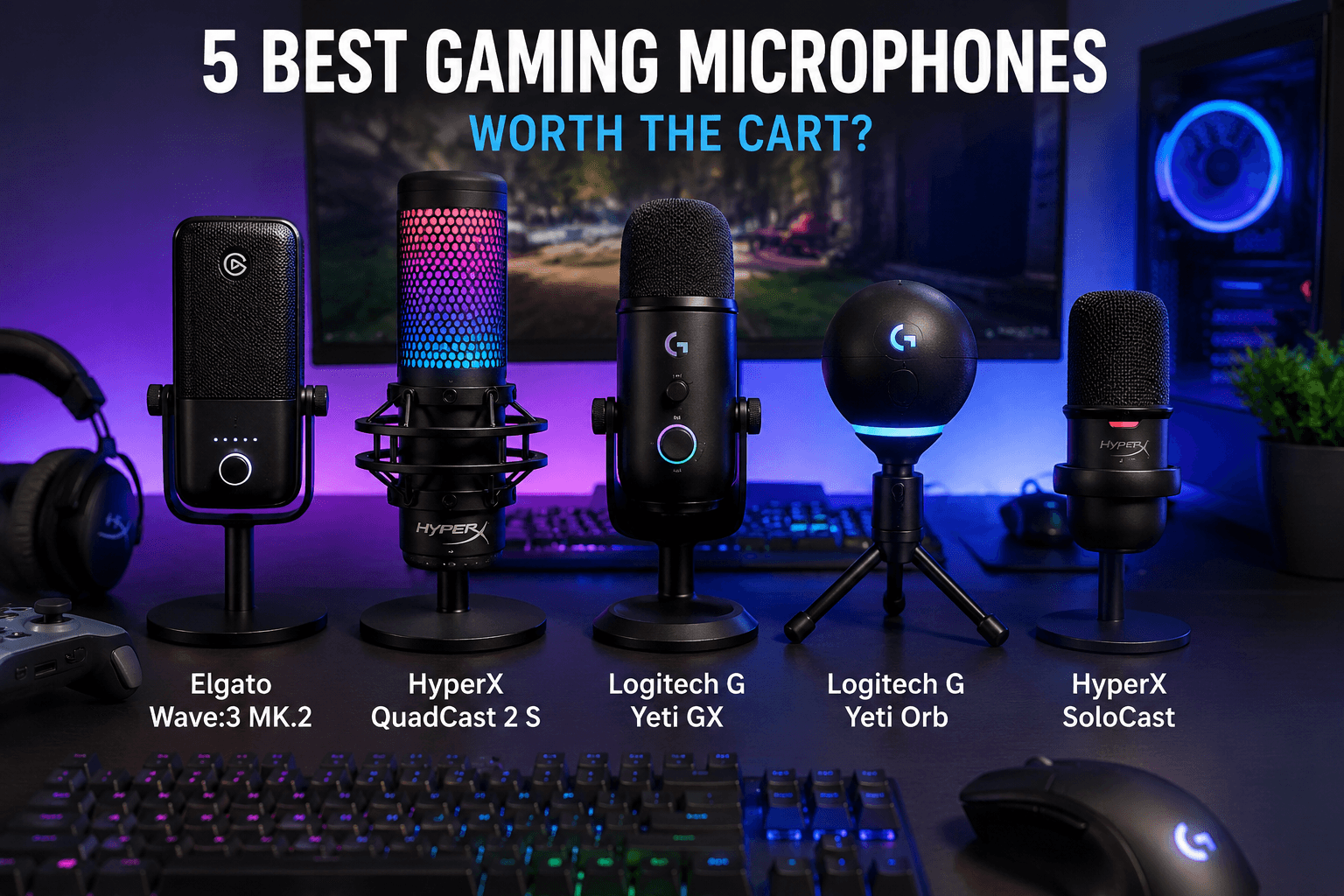
Products Compared:
Elgato Wave:3 MK.2
HyperX QuadCast 2 S
Logitech G Yeti GX
Logitech G Yeti Orb
HyperX SoloCast
Brands: Elgato, HyperX, and Logitech G
Price: Check current Amazon prices, since microphone prices and discounts change often.
Price Range: Budget USB mic to premium streaming microphone
Approximate Price Range: Around $50–$200+, depending on current Amazon deals and bundles
Highest Price Product: HyperX QuadCast 2 S, depending on current Amazon pricing
Top Score: 9.0/10
Best Product Score: Elgato Wave:3 MK.2 — 9.0/10
Best Value Pick: HyperX SoloCast
Cart Verdict: Buy based on your biggest audio problem. If you want the cleanest all-around setup, choose the Elgato Wave:3 MK.2. If you want a good mic without spending much, choose the HyperX SoloCast. If your keyboard is loud, look at the Logitech G Yeti GX.
Best For:
The Elgato Wave:3 MK.2 is best for streamers and creators who want strong sound, great software, and a clean setup.
The HyperX QuadCast 2 S is best for streamers who want good audio, RGB, onboard controls, and a mic that looks good on camera.
The Logitech G Yeti GX is best for gamers with loud keyboards, background noise, or a less controlled room.
The Logitech G Yeti Orb is best for beginners who want a simple RGB microphone that looks nice and works without much setup.
The HyperX SoloCast is best for budget gaming, Discord, Twitch, YouTube, and anyone upgrading from a headset mic.
General Pros:
Better voice quality, cleaner Discord calls, better streaming audio, simple USB setup, useful mute controls, better content quality, and less “cheap headset mic” sound.
General Cons:
USB microphones can still pick up keyboard noise, desk stands are not always ideal, condenser mics need decent room control, RGB can distract from actual audio quality, and premium mics may be overkill if you only use Discord casually.
A gaming microphone is one of those upgrades that sounds unnecessary until you hear the difference.
A better GPU makes your game look smoother.
A better monitor makes everything feel faster.
But a better microphone changes how other people experience you.
That matters more than people think.
If your voice sounds thin, distant, muffled, crunchy, or full of keyboard noise, nobody in Discord is going to say, “Wow, this person has an amazing setup.” They are just going to turn you down, mute you, or suffer quietly while your spacebar attacks their ears.
So the real question is not which gaming microphone has the most RGB.
The real question is this: which mic makes daily life noticeably easier, cleaner, calmer, or more fun — enough to justify taking up space in your cart and on your desk?
For this review, I am comparing five popular USB gaming microphones:
Elgato Wave:3 MK.2
HyperX QuadCast 2 S
Logitech G Yeti GX
Logitech G Yeti Orb
HyperX SoloCast
And the short answer is this:
The Elgato Wave:3 MK.2 is the best overall pick if you want a serious USB microphone for gaming, streaming, podcasting, and content creation.
The HyperX QuadCast 2 S is the best pick if you want a gaming mic that sounds good and looks amazing on camera.
The Logitech G Yeti GX is the best pick if your gaming setup is noisy and you want a dynamic mic that focuses more on your voice.
The Logitech G Yeti Orb is the best simple RGB option if you want something easy and affordable.
The HyperX SoloCast is the best value pick if you just want to stop sounding like a headset mic.
That sounds simple.
But the best gaming microphone depends heavily on what kind of gamer or creator you are.
Elgato Wave:3 MK.2
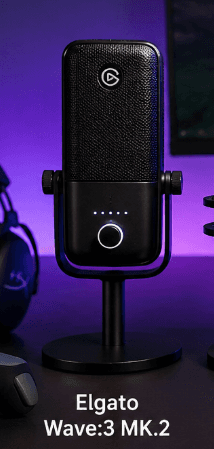
The Elgato Wave:3 MK.2 is the best overall microphone in this comparison because it understands something important:
A streaming mic is not only about the microphone.
It is about the full audio setup.
That is where the Elgato Wave:3 MK.2 feels strongest. It is not just trying to capture your voice. It is trying to make your whole audio workflow easier.
For gaming, that matters. You might have Discord open. Maybe game audio. Maybe music. Maybe alerts. Maybe a browser tab. Maybe OBS. Maybe you are recording, streaming, or talking with friends while something else is running in the background.
Bad audio setups get messy fast.
The Elgato Wave:3 MK.2 is built for people who want control without feeling like they need a full studio.
It has that clean Elgato ecosystem feeling. The mic itself looks simple and professional, but the real value is how it fits into a creator setup. It feels less like a flashy gaming toy and more like a serious tool you can use for streaming, podcasting, YouTube, Discord, and voiceover work.
That is why it wins.
Not because it has the most RGB.
It does not.
Not because it is the cheapest.
It is not.
It wins because it is the microphone I would trust most as a long-term desk upgrade.
For value, I would give the Elgato Wave:3 MK.2 an 8.7/10.
It is not a budget mic, but it feels like you are paying for more than just a capsule in a metal body. You are paying for software, processing, clean control, and a setup that can grow with you.
If you only play games casually and talk in Discord once in a while, it might be more microphone than you need.
But if you stream, record videos, make voiceovers, podcast, or care about sounding better online, the value becomes much stronger.
For use, the Elgato Wave:3 MK.2 gets a 9.3/10.
This is where it shines.
A good gaming microphone should not make your setup harder. The Elgato Wave:3 MK.2 feels like it was made for people who want better audio without becoming audio engineers.
That is the sweet spot.
For build, I would give the Elgato Wave:3 MK.2 an 8.8/10.
It looks clean, modern, and professional. It does not scream “gaming microphone” in the way some RGB-heavy products do. That can be a good thing if your setup is more minimal.
For regret, it gets a 9.1/10.
Would I buy the Elgato Wave:3 MK.2 again with my own money?
Yes.
Especially if I was streaming, recording videos, or wanted one USB microphone that felt serious without needing an audio interface.
The Elgato Wave:3 MK.2 is the safest premium recommendation here.
WorthTheCart Rating: 9.0/10
HyperX QuadCast 2 S
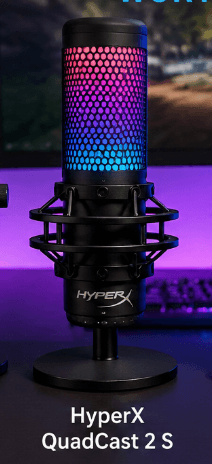
The HyperX QuadCast 2 S is the microphone that looks the most like a gaming microphone.
That can be good or bad, depending on your setup.
If you want something clean and low-key, the Elgato Wave:3 MK.2 probably fits better.
But if you want your microphone to be visible on stream, match your RGB setup, and feel like part of a gaming room, the HyperX QuadCast 2 S makes a lot of sense.
This is the most visually exciting mic here.
But the reason it ranks high is not just the lighting.
The HyperX QuadCast 2 S has onboard controls, tap-to-mute, a removable shock mount, multiple polar patterns, and the kind of desk presence that makes it feel like a complete streaming product right out of the box.
That matters because some microphones need extra accessories before they feel good. A boom arm. A shock mount. A pop filter. Better placement. More setup.
The HyperX QuadCast 2 S feels more complete immediately.
For value, I would give the HyperX QuadCast 2 S an 8.4/10.
It is one of the more expensive mics in this comparison, so the value depends on whether you care about the whole package. If you only want the best possible voice for the lowest price, this is probably not the smartest buy.
But if you want good audio, RGB, useful controls, and a microphone that looks great on camera, the value improves.
For use, it gets an 8.9/10.
The tap-to-mute feature is genuinely useful. So are the onboard controls. The removable shock mount is also nice because desk bumps and keyboard vibrations can become annoying fast.
For build, I would give the HyperX QuadCast 2 S a 9.0/10.
This is one of the strongest build scores here because the product feels like a full desk centerpiece. It has presence. It looks good. It feels intentional.
For regret, it gets an 8.7/10.
Would I buy the HyperX QuadCast 2 S again?
Yes, if I wanted a streaming microphone that looked as good as it sounded.
But if I wanted a cleaner, more software-focused setup, I would still choose the Elgato Wave:3 MK.2.
That is the difference.
The HyperX QuadCast 2 S is the best-looking mic.
The Elgato Wave:3 MK.2 is the better all-around tool.
WorthTheCart Rating: 8.8/10
Logitech G Yeti GX
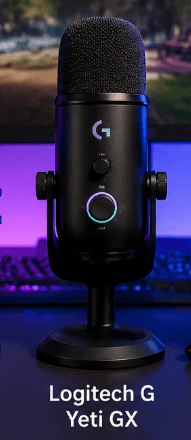
The Logitech G Yeti GX is the most interesting microphone here for people with noisy setups.
That is because the Logitech G Yeti GX is a dynamic microphone.
That matters.
Most beginner USB microphones are condenser mics. Condenser mics can sound clear and detailed, but they can also pick up more room noise, keyboard clicks, mouse clicks, fans, and random background sounds if your setup is not controlled.
A dynamic mic is usually better at focusing on what is close to it.
In gaming terms, that means the Logitech G Yeti GX makes sense if you have a mechanical keyboard, a noisy room, or people nearby.
It is not magic. No microphone can erase a bad room completely. But the direction of the product makes sense for gaming.
The Logitech G Yeti GX also has RGB LIGHTSYNC, USB plug-and-play, and a gaming-focused design that fits well in a Logitech setup.
For value, I would give the Logitech G Yeti GX an 8.5/10.
It is good value if your biggest issue is background noise. If you already know your room is loud, buying a mic that is better suited to that problem is smarter than buying the prettiest condenser mic.
For use, it gets an 8.7/10.
The Logitech G Yeti GX is straightforward. Plug it in, place it correctly, and it should make your voice feel more focused than a lot of cheap desk mics.
Placement still matters, though. Dynamic mics usually work best when they are closer to your mouth. If you put it too far away, you lose the benefit.
For build, I would give the Logitech G Yeti GX an 8.7/10.
It looks modern, gaming-focused, and cleaner than older bulky USB mics. The RGB is there, but it is not the whole product.
For regret, it gets an 8.6/10.
Would I buy the Logitech G Yeti GX again?
Yes, if I had a noisy keyboard or room.
But if I wanted the best streaming software setup, I would pick the Elgato Wave:3 MK.2. If I wanted the most eye-catching stream mic, I would pick the HyperX QuadCast 2 S.
The Logitech G Yeti GX is best when noise control is the main problem.
WorthTheCart Rating: 8.6/10
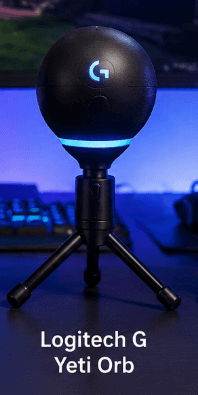
Logitech G Yeti Orb
The Logitech G Yeti Orb is the simple Logitech option.
It is not trying to be the most advanced microphone here.
It is trying to be easy.
That is the whole appeal.
The Logitech G Yeti Orb gives you a small USB condenser microphone with RGB LIGHTSYNC, a cardioid pickup pattern, and a plug-and-play experience for PC and Mac. It is the kind of product that makes sense if you want your setup to look better and sound better without spending too much time learning audio.
This is a good first microphone for someone who wants something nicer than a headset mic but does not need a premium streaming setup.
For value, I would give the Logitech G Yeti Orb an 8.3/10.
It is a decent value if you want something simple, stylish, and easy to use.
But the value gets weaker if the price gets too close to the Logitech G Yeti GX or HyperX SoloCast. At that point, you need to think about whether you care more about RGB style, voice focus, or budget.
For use, it gets an 8.4/10.
It is easy to set up and easy to live with. That is its main strength.
The downside is that it is still a basic condenser mic. If your room is noisy or your keyboard is loud, the Logitech G Yeti GX is probably the better Logitech pick.
For build, I would give the Logitech G Yeti Orb an 8.2/10.
It looks nicer than many budget microphones and fits well in a clean gaming setup. It does not feel as serious as the Elgato Wave:3 MK.2, and it does not have the desk presence of the HyperX QuadCast 2 S, but it does not need to.
For regret, it gets an 8.0/10.
Would I buy the Logitech G Yeti Orb again?
Maybe.
I would buy it if I wanted a simple RGB microphone and did not want to spend much.
But for pure value, I would compare it closely against the HyperX SoloCast. For noisy gaming rooms, I would move up to the Logitech G Yeti GX.
The Logitech G Yeti Orb is a good beginner mic, but not the most exciting winner.
WorthTheCart Rating: 8.2/10
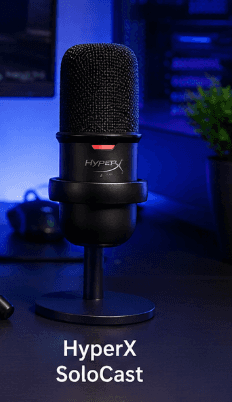
HyperX SoloCast
The HyperX SoloCast is the best value pick in this comparison.
Not because it is the best microphone.
It is not.
Not because it has the most features.
It definitely does not.
It wins value because it solves the biggest problem for the lowest amount of effort: sounding better than a headset mic.
That is all many people need.
If you are gaming with friends, joining Discord calls, streaming casually, recording simple voiceovers, or starting YouTube without spending too much, the HyperX SoloCast makes a lot of sense.
It is simple. USB. Cardioid. Tap-to-mute. Small enough for most desks. Easy enough for beginners.
There is nothing dramatic here.
That is why it works.
For value, I would give the HyperX SoloCast a 9.2/10.
This is the strongest value score in the comparison. If your current mic is bad, the HyperX SoloCast gives you a clear upgrade without making you spend premium money.
That is exactly what a budget product should do.
For use, it gets an 8.5/10.
It is easy to set up and easy to understand. The tap-to-mute sensor is useful, especially when you need to cough, talk to someone, or panic because your dog just started barking mid-game.
For build, I would give the HyperX SoloCast a 7.8/10.
This is where you feel the price. It does not have the same premium look or control set as the HyperX QuadCast 2 S, Elgato Wave:3 MK.2, or Logitech G Yeti GX.
But it is not trying to compete with them on features.
It is trying to be the cheap mic that actually makes sense.
For regret, it gets an 8.7/10.
Would I buy the HyperX SoloCast again with my own money?
Yes.
Especially if I was building a budget setup or recommending a first mic to someone who just wants better voice chat.
The HyperX SoloCast is not the best microphone here, but it might be the easiest one to justify.
WorthTheCart Rating: 8.5/10
Final Ranking
1. Elgato Wave:3 MK.2 — 9.0/10
Best overall. The strongest all-around USB microphone for gaming, streaming, podcasting, Discord, and creator work.
2. HyperX QuadCast 2 S — 8.8/10
Best RGB streaming pick. Great for people who want strong audio, useful controls, and a mic that looks good on camera.
3. Logitech G Yeti GX — 8.6/10
Best for noisy gaming setups. A smart pick if you have keyboard noise, background noise, or a less controlled room.
4. HyperX SoloCast — 8.5/10
Best value pick. The easiest recommendation for budget gaming, Discord, Twitch, and beginner streaming.
5. Logitech G Yeti Orb — 8.2/10
Best simple RGB mic. Good for beginners who want something affordable, clean, and easy, but not the strongest overall.
WorthTheCart Verdict
The best gaming microphone for most people is the Elgato Wave:3 MK.2.
It wins because it feels like the most complete long-term choice. It is clean, serious, software-friendly, and useful for more than just gaming.
The HyperX QuadCast 2 S is the better choice if you want your microphone to be part of the look of your setup. It is the most visually fun mic here and still has the features to back it up.
The Logitech G Yeti GX is the better choice if your biggest problem is noise. A dynamic microphone makes more sense for a loud gaming setup than many people realize.
The HyperX SoloCast is the best buy if you are trying to spend less but still want a real upgrade from a headset mic.
The Logitech G Yeti Orb is worth considering if you want a simple RGB desk mic, but it is not the one I would pick first unless the price is very good.
So, which gaming microphone is actually worth the cart?
Overall Winner: Elgato Wave:3 MK.2
The Elgato Wave:3 MK.2 is worth the cart if you want a gaming microphone that can also handle streaming, podcasting, YouTube, Discord, and serious creator work without making your setup feel complicated.
Pros
Better voice quality, cleaner Discord calls, better streaming audio, easy USB setup, useful mute controls, better YouTube and Twitch sound, more professional online presence, and a clear upgrade from most headset microphones.
Cons
USB microphones can still pick up keyboard noise, desk stands are not always ideal, condenser mics need decent room control, RGB can distract from actual audio quality, premium mics may be overkill for casual Discord use, and a good mic still needs proper placement to sound its best.
Final verdict
Worth adding to cart if it matches your needs and budget.